Back homeAI Tooling, Editor Tools & Shaders

AI tooling that multiplies a tech art team

I lead a Technical Art team with Claude wired into the Unity Editor through MCP. The result is measured, not vibes: up to 2× throughput and 213 hours saved in eight and a half weeks — on top of the editor tools and shaders that quietly keep artists unblocked.

Throughput multiplier at peak (1.7× over 8.5 weeks)

213 h

Saved in 8.5 weeks — about five working weeks

22

Claude agent skills written and in daily use

17

Unity Editor tools shipped in the tech-art package

3,500+

Unity Editor operations driven through MCP

86k

Words of artist tutorials, screenshots taken by script

Every number is re-runnable. Hours, sessions, commits, prefabs, words and tool calls are read from Claude Code session logs and git; only the “by hand” baselines are estimates, and those are listed openly so a reviewer can change one and watch the totals follow.

Where the multiplier comes from

Six workflows, measured

Bulk content and documentation run at 2–3×; scene iteration and debugging closer to 1.5×. AI does not decide anything — priorities, render-pipeline calls and what ships stay with me.

2.5×

Content generation from a spec

A wiki or design doc becomes finished Unity content — 551 prefabs (heroes, weapons, enemies, gear, buffs) created, sprites assigned, stats and merge rules wired, committed. Artists get the complete sample, not a representative handful.

2.6×

Artist tutorials & wikis

Inspector-only tutorials written straight from the module, screenshots captured by script from the real Unity window, every link verified against the paths artists actually have. 86,000 words across six guides — depth that would never be written by hand.

2.4×

Asset intake & catalogues

Unorganised asset dumps inventoried, migrated into Samples and published as an Assets Visual Guide — one page per game with a studio-lit thumbnail of every prefab and model. Credited by product with cutting artist production time and rolled out to every game.

2.5×

Unblocking artists

Package resolution errors, Samples~ links, LFS, broken shaders and materials, editor slowdowns — fixed and repackaged in the same session instead of the next day. Roughly 12 hours of artist downtime avoided per month.

1.6×

QA passes & triage

A two-phase QA method — static checks with no Unity, then live passes through MCP on a duplicated scene — writes one folder per problem with a repro and screenshots, and splits findings into “fix locally” vs “needs dev”. Tickets reach engineers with a repro, a scene and a path.

25 h/mo

The ops layer

A nightly agent leaves a five-section brief in Slack before the workday — team WIP by person, blockers, meetings, messages needing a reply — and keeps per-game trackers, team capacity and 1:1 prep current across monday.com and Slack. Built once, runs overnight.

The AI skills library

Written down, so it transfers

22 Claude agent skills turn tribal knowledge into something another tech artist can run: the QA method, the tutorial format, the asset process, the rules for touching code we don't own. A selection:

QA

Process

The two-phase QA method: static checks (filesystem, git, YAML, GUIDs) before Unity opens, then in-editor test passes; also writes the Figma requirements audit and files the tickets.

Tutorial + Tutor

Content

Tutorial authors and updates artist-facing guides with editor screenshots. Tutor answers an artist’s “how do I…” as numbered clicks read straight out of those guides — never code, never a doc dump.

ModulePR

Process

The standing rule for code we don’t own: never edit a shared module in place. Worktree isolation, a feature branch, a dev-facing note, a pull request and the feedback task that carries the link.

AssetsVisualGuide + AssetsScene

Content

Renders a studio-lit thumbnail of every prefab and model in a package into a filterable HTML guide, and lays the same assets out in one review scene by category — problems on a red strip.

Assets

Content

Audits a new game’s asset dump against the asset-manager checklist: what survives import, duplicates, folder weight, a must-have / nice-to-have split and a contact sheet ready to share.

Module brains

Module brain

One skill per game module — units, stats, merging, physics, cameras, audio — so “why does this unit deal no damage?” is answered from the Inspector, without reading the code.

LocalDeps · SamplesLink · NewSamplesRepo

Process

Package plumbing: local checkouts without ever committing local paths, the Samples~ link Unity needs to see hidden samples, and the scaffold for a new samples repo.

Perf

Process

Captures Unity Profiler data from Play mode and grades a playground against the handover budget — 60 FPS median, no frame over 100 ms, zero logged errors.

Team-lead cockpit

Ops

Daily brief, who runs dry on tasks, asset deadlines, 1:1 canvases and calendar blocking — the routines that keep a distributed tech-art team visible without status meetings.
Unity Editor tools & hooks

The tools the skills drive

17 C# editor windows and menu commands, plus the scripts and hooks around them — built to be clicked by an artist or driven by an agent, and idempotent so they can be re-run after every fix.

Tutorial Prompt Creator + Viewer

Scans a module and writes the tutorial skeleton plus a self-contained Markdown viewer window that ships inside the sample — TOC, search, inline images, and it re-parses live while an AI rewrites the file under it.

Asset Exporter

Drop in any asset or folder; it resolves every transitive dependency, copies to a destination and rewrites GUIDs so the copies reference each other. With undo.

VFX Visualizer

A live grid of looping previews for every VFX in a folder — VFX Graph assets and Shuriken prefabs alike, resolved by reflection so it compiles with or without the package.

Assets Scene + Grid Organizer

Builds a review scene with every asset of a type on a non-overlapping grid, and lays any scene selection on an XZ grid with live preview and ground labels.

Spine Processor

Flags Spine prefabs whose skeleton, data asset and atlas resolve to different spine-unity versions, realigns them, and repairs premultiplied-alpha atlases in Linear colour space.

Performance Capture

Profiler capture from Play mode, exported and graded against the playground handover budget before anything reaches artists.

Game importers

Idempotent importers that turn a studio’s .max / .ma / FBX dumps into wired prefabs with per-asset folders — converting sources through 3ds Max and Maya batch when no FBX exists.

Unity Window Capture

Screenshots the real Unity Editor window — including the GPU-rendered Game view that in-editor helpers can’t reach — on Windows and macOS. Every tutorial image comes from it.

Editor hooks

A gate that stops Claude from driving the wrong Unity instance when two are open, an opt-in MCP-for-Unity installer, a chime when a long run finishes, and a one-key “free unused editor memory” command.

Scripts & shaders

Code you can open

Personal tools and shaders, with the source attached where there is code — the kind of quiet, practical work that makes everyone else's day smoother.

script

Asset Exporter

Unity Editor Tool

A Unity Editor tool that exports clean prefabs from any project. Strips non-whitelisted components, saves meshes/materials/textures as standalone assets, and can optionally replace scene objects or generate a new .unity scene — all configurable via a ScriptableObject settings panel.

UnityC#Editor ToolPipelineScriptableObject
script

Character Clothing Sync

Unity Runtime Component

A Unity MonoBehaviour that automatically remaps clothing bones to the character skeleton — works in both Edit Mode and Play Mode. Handles custom skeletons (hair, accessories) gracefully, reparents unmatched bones by proximity, and syncs blend shapes so body customization always propagates to equipped outfits.

UnityC#Character TechSkinningRuntime
shader

Particles Alpha Shader

Unity Custom Shader

A transparent particle shader with tiling, UV offset, tint color, and brightness multiplier. Fully supports Unity's Particle System vertex colors (Start Color, color-over-lifetime) and renders in the Transparent queue with ZWrite Off — no sorting artifacts, no scene lighting interference.

UnityHLSLShaderLabVFXParticles
shader

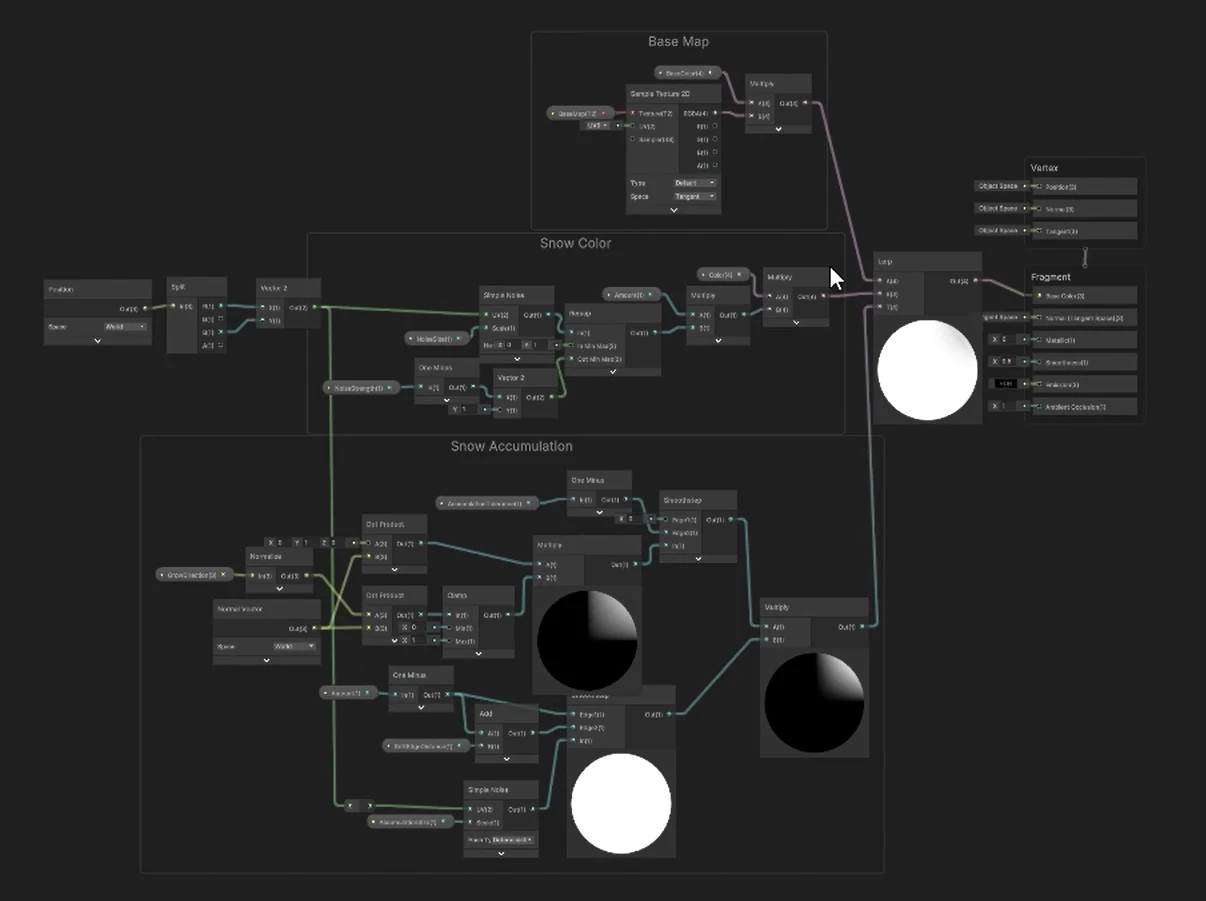
Snow Accumulation Shader

URP Shader Graph

Shader Graph network for the snow accumulation shader: Base Map, Snow Color and Snow Accumulation groups

A world-space snow shader built in Shader Graph: snow gathers on surfaces facing a configurable grow direction (dot product with the world normal), with smoothstep-controlled coverage, noise-broken edges and a noise-tinted snow colour blended over the base map — tweakable per material, no textures to paint.

UnityURPShader GraphProceduralEnvironment

Built in C#, HLSL, ShaderLab and Shader Graph — developed with AI assistance to move fast and ship reliable tools.

Like what you see?

I'd love to hear about your team and what you're building.

Get in touch